The Server Downtime Panic: How to Talk to Hosting Support in English Clearly Without Technical Vocabulary Overload or Sounding Inexperienced
There are very few situations in the modern digital world that create instant stress as quickly as discovering that your website has suddenly stopped working. One moment everything feels completely normal. Your traffic is coming in, pages are loading properly, your ads are running, customers are browsing products, affiliate clicks are happening, blog readers are visiting your content, or clients are checking your portfolio. Then suddenly, without any warning, the site refuses to load. Maybe the homepage becomes blank. Maybe WordPress crashes completely. Maybe the admin dashboard stops opening. Maybe visitors begin sending screenshots saying the website is inaccessible. Maybe you suddenly see terrifying messages like “500 Internal Server Error,” “503 Service Unavailable,” “Database Connection Error,” or “This site can’t be reached.”
And in that exact moment, your entire emotional state changes almost instantly.
Your brain immediately starts racing.
“How long has the site been down?”
“Am I losing traffic right now?”
“Are customers leaving?”
“What if Google rankings drop?”
“What if clients think I’m unprofessional?”
“What if my hosting server completely crashed?”
For many people today, websites are no longer just side projects or hobbies. A website can represent an entire business, career, personal brand, ecommerce store, SaaS platform, portfolio, freelancing operation, digital agency, affiliate business, or primary income source. So when the website suddenly stops functioning, the emotional pressure feels very real because downtime directly affects money, trust, reputation, and operations.
Now imagine trying to solve all of this while communicating in English with hosting support agents, server administrators, technical support teams, or live chat representatives.
Suddenly the challenge becomes much bigger.
You are not only dealing with a technical emergency anymore.
You are also trying to:
- explain technical problems clearly
- understand unfamiliar technical English
- ask the correct troubleshooting questions
- describe symptoms accurately
- stay calm under pressure
- avoid misunderstanding important instructions
- sound professional while stressed internally
This is one of the most overlooked real-world English communication situations for freelancers, bloggers, developers, affiliate marketers, ecommerce owners, remote workers, agencies, and online business owners.
Because honestly, the difficult part is not always the technical issue itself.
Sometimes the harder part is communication during stress.
Many English learners experience panic thoughts like:
- “What exactly should I say?”
- “What if I explain the issue badly?”
- “What if the support agent uses technical words I don’t understand?”
- “What if they ask questions I cannot answer?”
- “What if I sound inexperienced?”
- “What if my site stays down longer because I communicated incorrectly?”
These fears are completely understandable.
Technical support conversations feel very different from casual English conversations.
During casual conversations, small grammar mistakes usually do not matter much. But during technical emergencies, every detail suddenly feels important because time matters. If your website is losing traffic every minute, your brain naturally becomes more emotional and anxious. Under stress, even people with decent English skills sometimes struggle to think clearly because panic affects communication quality heavily.
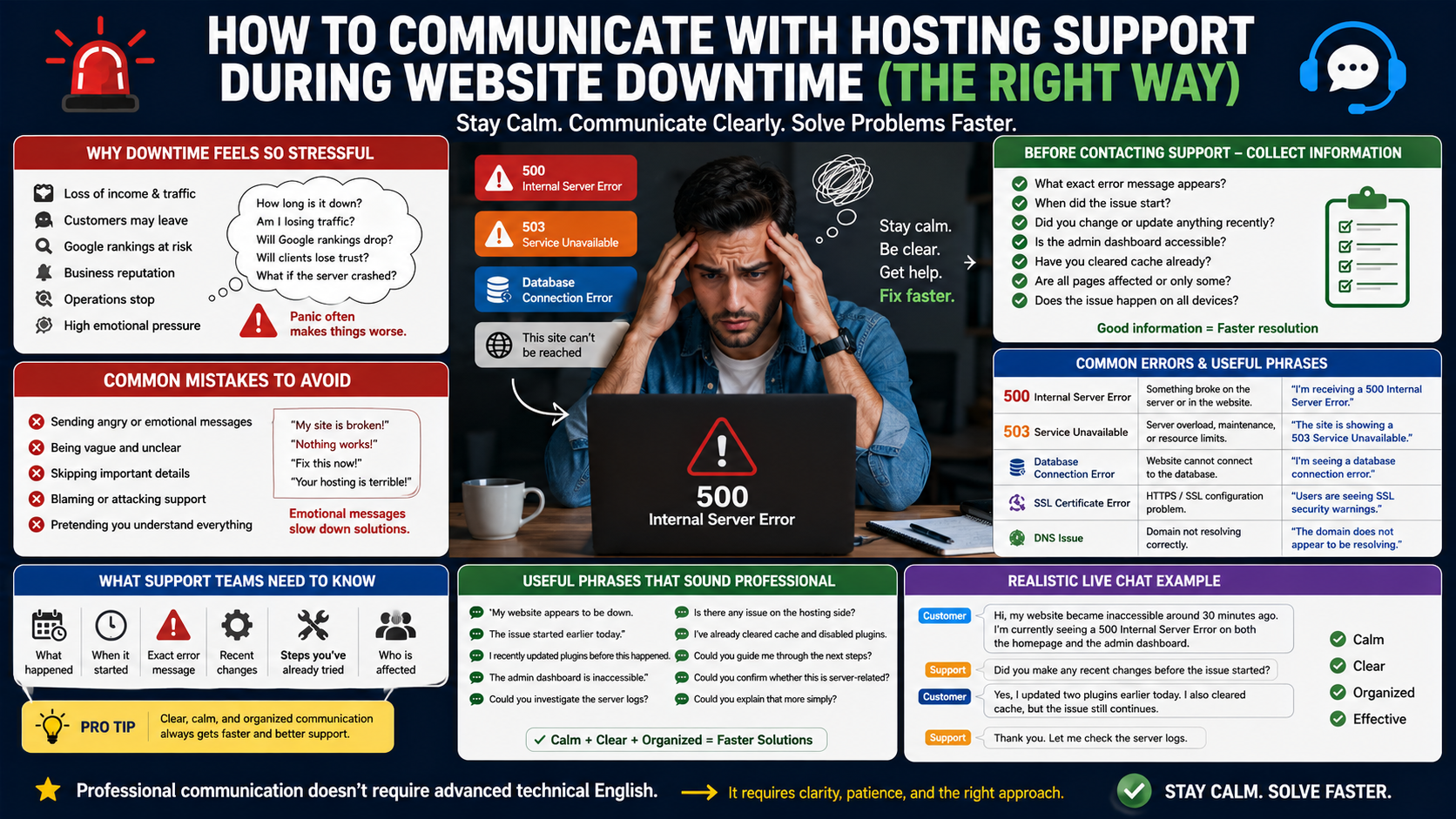
One of the biggest mistakes people make during website emergencies is becoming emotionally chaotic while talking to support teams. They begin sending angry rapid-fire messages like:
- “My entire site is broken!”
- “Nothing works!”
- “Fix this immediately!”
- “Your hosting is terrible!”
- “Everything crashed!”
- “Why is your server always down?”
While frustration is understandable, emotional communication usually slows troubleshooting instead of improving it.
Why?
Because support agents still need organized information.
They need to know:
- what happened
- when it started
- what exact error appears
- what changed recently
- what troubleshooting steps were already attempted
- whether the issue affects everyone or only certain users
Strong communication during technical emergencies is not about sounding dramatic.
It is about sounding:
- calm
- clear
- organized
- logical
- cooperative
even when you are stressed internally.
Another important thing many learners misunderstand is thinking they need extremely advanced technical English to communicate professionally with hosting support.
Honestly, this is not true at all.
Most successful support conversations rely more on clear descriptions than complicated technical vocabulary.
Even native speakers often explain problems very simply:
- “My site stopped loading after updating plugins.”
- “The homepage works but internal pages return errors.”
- “The admin dashboard is inaccessible.”
- “The website became extremely slow.”
- “Users are seeing SSL warnings.”
- “I’m getting a database connection error.”
These are simple sentences.
But they communicate useful technical information clearly.
Another major challenge during these conversations is listening comprehension and technical vocabulary overload.
Support agents often type quickly because they handle many tickets every day. Sometimes they use technical phrases like:
- DNS propagation
- SSL certificate
- CDN conflict
- backend timeout
- firewall restriction
- caching issue
- nameserver problem
- malware infection
- database corruption
- PHP conflict
- CPU spike
- server overload
- bandwidth limit
- resource usage
- plugin conflict
When learners hear multiple unfamiliar terms quickly, panic often increases because the brain starts focusing more on fear than actual understanding.
Many people then make another huge mistake:
they pretend they understood everything.
This creates even bigger problems because misunderstanding technical instructions can lead to incorrect troubleshooting steps.
Strong professional communication means asking clarification questions confidently.
Experienced professionals ask questions constantly during technical troubleshooting because accuracy matters more than ego.
Useful phrases include:
- “Could you explain that more simply?”
- “I’m not very technical, could you guide me step-by-step?”
- “Can you clarify what caused the issue?”
- “I just want to confirm I understood correctly.”
- “What should I check first?”
- “Could you explain what that error means?”
These are not weak questions.
These are professional questions.
Another important reality is that website downtime conversations often happen under heavy time pressure.
You may have:
- customers unable to place orders
- clients waiting for updates
- campaigns currently running
- ad traffic still coming
- sales temporarily stopped
- readers messaging you
- rankings potentially affected
This naturally creates emotional intensity.
However, experienced professionals understand something extremely important:
Panic rarely solves technical problems faster.
Calm structured communication almost always improves troubleshooting speed because support teams can diagnose issues more efficiently when information is organized properly.
For example, compare these two support requests.
Emotional Version
“My website is completely broken and nothing works!”
Professional Version
“My WordPress website started returning a 500 Internal Server Error around one hour ago after updating two plugins. The admin dashboard is also inaccessible.”
The second version immediately provides:
- timing
- probable trigger
- symptoms
- technical direction
This dramatically improves troubleshooting quality.
Another challenge many learners face is writing support tickets professionally.
Some people send extremely short vague messages like:
- “Site down.”
- “Help fast.”
- “Problem server.”
Others send huge emotional paragraphs filled with unrelated information.
Strong technical communication usually stays focused on:
- the issue
- the timeline
- attempted fixes
- current symptoms
Clarity matters more than complexity.
Another thing experienced professionals understand is that technical support teams usually become more cooperative when communication stays respectful and solution-focused.
Support agents are human beings too.
They deal with stressed customers all day.
If communication becomes aggressive immediately, conversations often become more tense and less productive.
This does NOT mean accepting poor service silently.
It simply means staying professional while solving the issue.
This guide is going to explore:
- how to communicate with hosting support professionally
- how to explain website problems clearly
- how to ask troubleshooting questions naturally
- how to understand common technical terms
- how to stay calm during downtime emergencies
- how to write professional support tickets
- how to sound confident even if you are not highly technical
Most importantly, we are going to approach this like real human communication instead of robotic textbook IT English.
Because honestly, one of the strongest signs of professional maturity today is the ability to stay calm and communicate clearly while solving stressful technical problems.
Why Website Downtime Feels So Emotional
Website downtime creates emotional stress because websites today directly affect:
- income
- traffic
- customer trust
- business operations
- credibility
- rankings
- productivity
If an ecommerce store goes down:
sales stop immediately.
If a freelancer’s portfolio disappears:
clients may question professionalism.
If a blog crashes during high traffic:
ad revenue may decrease quickly.
If a SaaS platform becomes inaccessible:
users may become frustrated instantly.
This emotional pressure naturally affects communication quality.
People start:
- typing too quickly
- skipping important details
- becoming reactive
- forgetting troubleshooting logic
- misunderstanding instructions
Strong communication begins by slowing down mentally first.
The First Thing You Should Do Before Contacting Support
One of the smartest professional habits during technical emergencies is collecting information BEFORE contacting support.
Do not immediately panic-message hosting support without checking anything.
First gather:
- exact error message
- screenshots
- recent updates
- plugin/theme changes
- timing of issue
- whether issue affects all devices
- whether admin dashboard works
- whether only certain pages fail
This instantly improves communication quality.
Simple Pre-Support Checklist
| Question | Why It Matters |
|---|---|
| What exact error appears? | Helps diagnosis |
| When did issue start? | Helps identify trigger |
| Did you update anything recently? | Common root cause |
| Is admin dashboard accessible? | Indicates severity |
| Did you clear cache already? | Eliminates simple issues |
| Are all pages affected? | Narrows problem scope |
Support teams troubleshoot faster when information is organized.
Why Technical Conversations Feel Intimidating
Technical conversations feel intimidating because many learners fear sounding inexperienced.
People think:
- “I’m not a developer.”
- “I don’t understand servers.”
- “I don’t know technical vocabulary.”
- “What if I sound stupid?”
But honestly?
Most hosting companies work with non-technical customers every day.
Their customers include:
- bloggers
- freelancers
- agencies
- ecommerce sellers
- affiliate marketers
- coaches
- creators
- business owners
Support teams care much more about:
clear communication
than impressive vocabulary.
Understanding Common Website Errors
Before talking to support, it helps to understand common website problems.
500 Internal Server Error
This usually means something broke on the server or inside the website configuration.
Possible causes:
- plugin conflicts
- corrupted files
- PHP issues
- server misconfiguration
Useful phrase:
“I’m currently receiving a 500 Internal Server Error on both the homepage and dashboard.”
503 Service Unavailable
This often indicates:
- server overload
- maintenance
- resource limits
- temporary downtime
Useful phrase:
“The site is currently showing a 503 Service Unavailable error.”
Database Connection Error
This means the website cannot communicate with the database properly.
Possible causes:
- database crash
- incorrect credentials
- overloaded server
Useful phrase:
“I’m seeing a database connection error while loading the site.”
SSL Certificate Error
This happens when HTTPS security configuration fails.
Useful phrase:
“Users are currently receiving SSL security warnings.”
DNS Issue
DNS problems usually happen after:
- domain changes
- nameserver updates
- migration
Useful phrase:
“The domain does not appear to be resolving correctly.
Practical Hosting Support Phrases
Professional technical communication often uses calm natural sentences.
Examples:
- “My website appears to be down.”
- “The issue started earlier today.”
- “I recently updated plugins before this happened.”
- “The admin dashboard is inaccessible.”
- “Could you investigate the server logs?”
- “Is there any issue on the hosting side?”
- “I’ve already cleared cache and disabled plugins.”
- “Could you guide me through the next troubleshooting steps?”
- “Could you confirm whether this issue is server-related?”
These phrases sound calm and professional.
Realistic Live Chat Conversation Example
Customer
“Hi, my website became inaccessible around 30 minutes ago. I’m currently seeing a 500 Internal Server Error on both the homepage and the admin dashboard.”
Support Agent
“Did you make any recent changes before the issue started?”
Customer
“Yes, I updated two plugins earlier today. I also cleared cache, but the issue still continues.”
Support Agent
“Thank you. Let me check the server logs.”
Notice how:
- communication stays calm
- information stays organized
- no emotional chaos appears
This improves troubleshooting dramatically.
Why Timing Matters Technically
Timing is extremely important during technical troubleshooting.
Recent changes often reveal root causes quickly.
Examples:
- plugin updates
- theme installation
- DNS changes
- migrations
- PHP version changes
- CDN configuration
- SSL renewal
That is why support teams often ask:
“Did anything change recently?”
Because timing helps narrow the investigation quickly.
My Opinion
Honestly, one thing that separates experienced professionals from beginners is emotional control during technical problems.
Beginners often:
- panic immediately
- blame emotionally
- send vague messages
- skip important details
Experienced professionals focus on:
- symptoms
- timing
- diagnosis
- communication clarity
- troubleshooting sequence
Why?
Because emotional chaos rarely fixes servers faster.
Calm communication improves collaboration significantly.
And honestly, this skill becomes valuable far beyond hosting support conversations too.